
🧊
Stock check in seconds
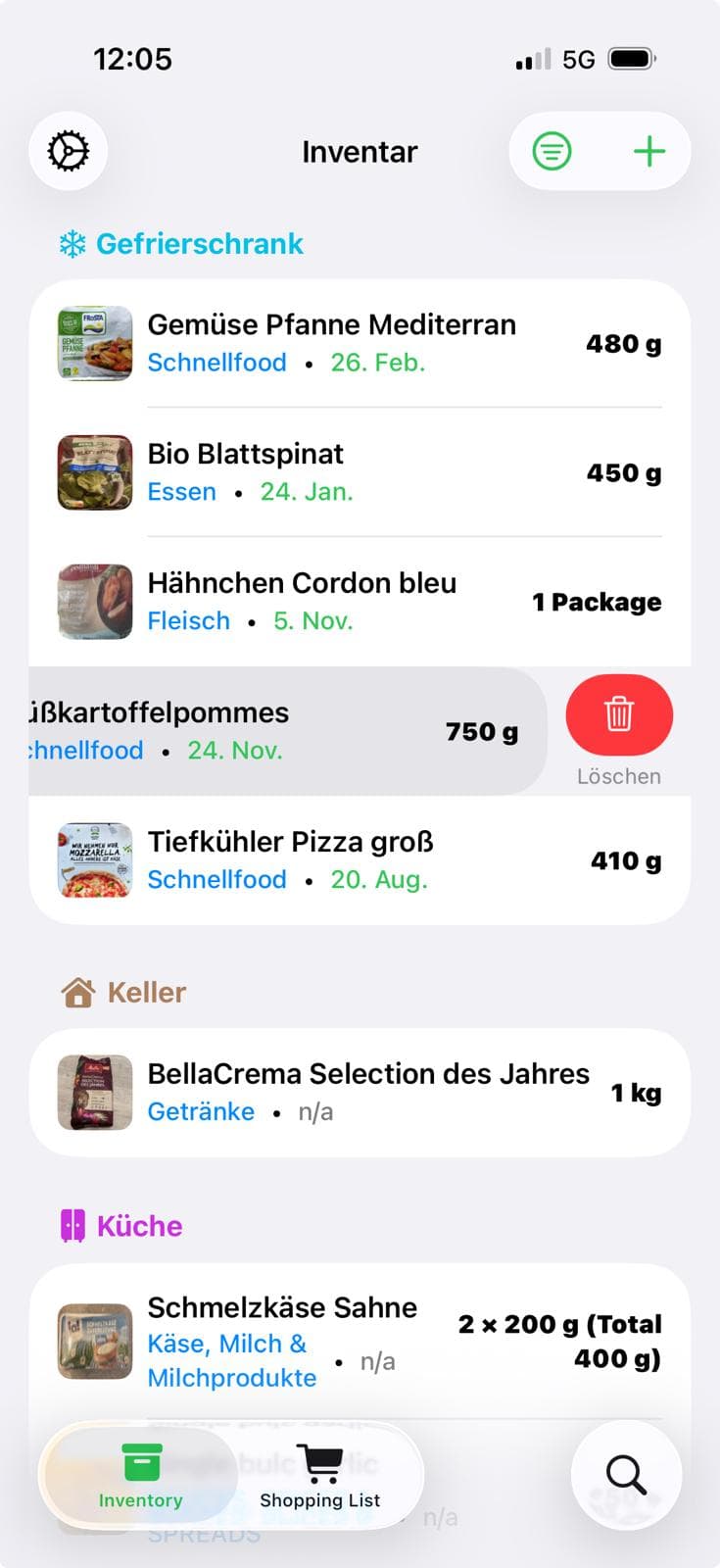
See immediately what’s in your inventory—complete with real product photos, up-to-date quantities, and expiry dates.
Track your food inventory, share supplies with your household, and manage your shopping lists effortlessly—all in one smart app.
Pro plan can be canceled anytime.
Features
WhatTheFridge shows which foods are in your household, what’s coming due soon, and what’s on your shopping list. With WhatTheFridge, you can keep your inventory and shopping list up to date in one flow.
See immediately what’s in your inventory—complete with real product photos, up-to-date quantities, and expiry dates.
Remove an item from your inventory and add it to your shopping list right away—so nothing gets forgotten while shopping.
Everything is sorted and prioritized by expiry date so nothing gets forgotten.
Share your lists with roommates or family and keep your household and shopping lists synchronized in real time.
How it works
From capture to reminders: focus on cooking instead of keeping track.
Step 1
Save foods via text, voice, or barcode scan and store them in a structured way.
Step 2
Expiry dates are sorted automatically so you use what’s coming due soon first.
Step 3
Push notifications keep you informed in time—especially about critical items that are approaching their expiry date.
Step 4
Create shopping lists, add products, and you’re done! Your lists are always available in the app.
Step 5
Inventory and shopping lists sync both ways: remove from inventory -> add to shopping list -> shop -> update inventory. Done!
Step 6
Share your lists with your family or household—so everyone stays up to date on what’s in stock and what needs buying.
Text, voice, or barcode—every method lands in the same tidy inventory.
Enter quantity, expiry, and storage location in one step—ideal for batch updates.
One sentence is enough. WhatTheFridge understands your voice input and creates the item correctly.
Scan the code, import product details, adjust the expiry date, and you’re done.

Impact
WhatTheFridge helps you shop more sustainably and consume more consciously.
Rescue ingredients, extend their use, and lower your CO₂ footprint.
When you know what you have, you make fewer impulse purchases—your wallet will thank you.
Plan meals and shopping faster, skip extra supermarket trips, and get more time for what matters.
Get started
Download WhatTheFridge, unlock Pro when needed, and get continuous updates—cancel anytime.
Pro plan can be canceled anytime.
FAQ
Short answers while we roll out new features. Message us if anything’s missing.
Yes. The moment you remove a product from your inventory, we’ll ask whether you want to add it to one of your shopping lists.
No. Scans are part of the core app and included in the base package. Pro unlocks additional automations and household roles.
Yes. You can dictate the information you care about right when you enter the product; the app recognizes it immediately and saves it together with the product.
Yes, that’s easy—you can remove only a partial quantity of any product in your inventory. That way your inventory stays accurate and up to date.
Yes. Invite roommates or family members and use shared lists. Every update syncs instantly for everyone in your household.
